
The Real ROI of Order Automation Isn't Labor Savings

Every logistics team we talk to generally measures order entry the same way. Minutes saved per order i.e how long does it take a CSR to read a delivery order and key it into the TMS? Shave that number and you can prove the ROI on a slide. It's a clean metric but we don't think its the best one.
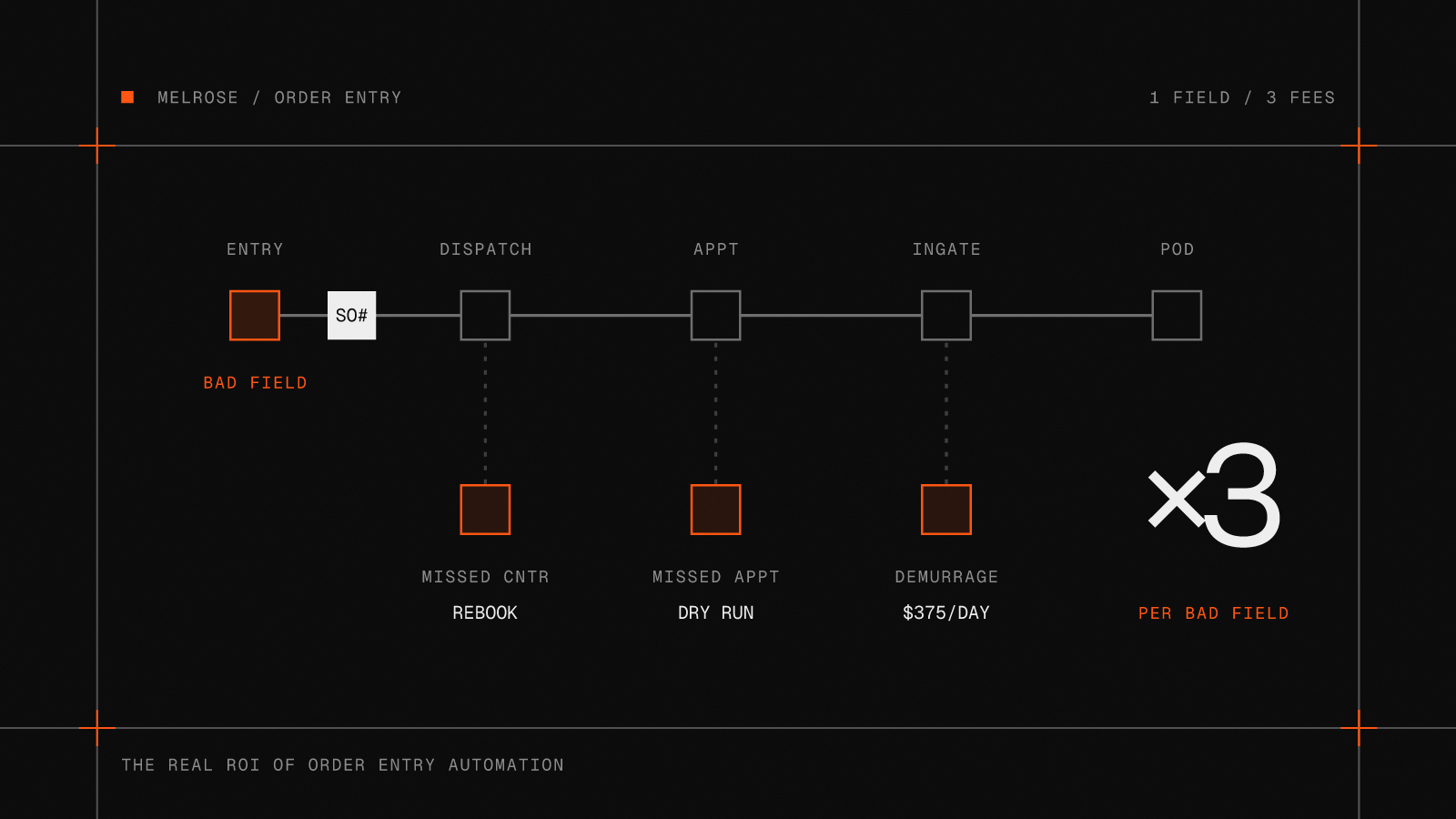
The minutes are real but it masks a lot of where the opportunity is. The most expensive order is not the one that took the longest to type into your TMS, it's the one that got entered wrong.
One typo, three days later
Every manual touch is a chance to introduce bad data:
- A mistyped container number
- An appointment keyed as 6PM instead of 6AM
- A PO that never made it off the second page
- A reference number sitting in the email body that nobody copied across
None of these feel expensive when they happen, it's often just a few seconds of attention or nobody notices at all. The second order effects tell a completely different story.
All of a sudden an order that took two minutes to enter into your TMS (which looks cheap on paper!) now has a mistake that took three days, four phone calls, and a demurrage invoice to unwind.
We no longer just count the minutes
We've stopped thinking about order automation as just a way to save time. We think about it as a way to remove variance.
A person entering the same order twice will do it two slightly different ways. Fresh at 9am, buried at 6pm, interrupted halfway through, working from a clean PDF one time and a photographed fax the next. The output drifts, and every system downstream inherits that drift.
People think the value of automation is that the machine is faster than the person. Sometimes it is, but the more useful property is that the machine is boring. It does the same thing at 6pm that it did at 9am, every day, every week, every year.
It was never really about the PDF
There is a version of this people picture when they hear order automation. A PDF comes in, software reads it, a load comes out. Unstructured document in, structured order out. That is the demo. It is also the smallest part of the story.
Orders don't show up as one clean PDF. Just in the past 24 hours after asking our team internally we've seen:
- Email's with the details in the body.
- A rate con on a forwarded thread.
- A note in a customer portal.
- A "can you also grab this one at the bottom of a message" about something else.
The intake itself is not a document. It is a surface, and quite often it's messier than any single format.
Automate one PDF and you've covered one lane of the problem. Capture the whole thing - email bodies, attachments, portal messages, the ad-hoc request buried three replies deep and the job changes. Your AI is no longer reading documents but you've created a process. Processes don't miss steps. They don't overlook an attachment, forget a follow-up buried in an email chain, or leave a container sitting in someone's inbox because the person handling it got distracted. That's the real shift we've seen: you're no longer making people faster at paperwork. You're building a workflow that's designed to catch everything.
That's where the misses go. Not because the software is clever about any one order, but because every order now travels the same defined path, no matter how it arrived. The email under fifteen others still gets seen. The forwarded thread still becomes a load. The number of things that can quietly fall through drops, because fewer of them depend on someone noticing in the first place.
Demurrage is just the easiest one to see
Demurrage is the cleanest example because the cost shows up on an invoice and it is almost always downstream of something small. A load gets built into the TMS late, or not at all, and it sits at the terminal past its free time. If you want the mechanics of how demurrage and detention actually get charged, we wrote a full guide. But the pattern is the interesting part: the fee is large, and the cause is tiny.
The demurrage is only the part you can see. The rebill that never went out, the appointment that did not get missed, the CSR who did not spend an hour on the phone. Those never show up on an invoice with your name on it, which is exactly why they are easy to underprice.
What the misses add up to
None of this means much without numbers, so here is the shape of it. Take an operation moving 500 orders a week. Say manual intake lets 3 in 100 slip into an avoidable exception, and a defined process cuts that to 1 in 200. Keep the cost of a miss identical in both columns, because a demurrage day costs the same whoever caused it. The only thing that changes is how often it happens.
That $595 is a blended figure: about two days of demurrage, a day of detention, a dry run on a failed pickup, and the CSR time to sort out the rebill. The gap between the two columns, a little under $390,000 a year, is not labor saved. It is exceptions that never happened. These numbers are illustrative, not a quote. The only version worth trusting is the one with your volumes and your rates in it.
This is also why the tool that does it does not have to be your system of record. The load still lives in the TMS. What changes is the layer in front of it, the thing that reads the document and builds the load the same way every time. We wrote separately about the difference between a TMS and the automation layer that sits on top of it.
The metric worth using
If you evaluate order automation by minutes saved per order, you're measuring the smallest part of its value. The labor savings are real, but they're the benefits you can already see. The larger gains usually come from the problems that never happen and never get directly surfaced.
Automation does not just do the work faster. It makes the work the same every time, and it makes sure the work happens at all. In an operation, that is worth more than speed. Melrose is AI that reads delivery orders and enters them into your TMS, removing the manual keying that drives the real cost.
Order automation FAQ
Does order entry automation save money or just time?
Both, but the money is usually the larger and less visible part. The time saved on data entry is easy to measure. The bigger return comes from fewer downstream errors: detention, demurrage, failed pickups, rebills, and the hours spent untangling them.
What downstream costs come from manual order entry?
A single wrong or missing field can turn into a missed pickup appointment, a container sitting past its free time, an invoice the customer disputes, or a chain of calls to sort out what happened. The order takes minutes. The exception can take days.
How does automating order entry reduce demurrage?
It does not prevent delays outside your control, like customs holds or terminal closures. It removes the avoidable ones: orders sitting unread in an inbox, loads that never got built in the TMS, and container numbers dropped in a handoff. One Melrose customer reported a 20% year-over-year reduction in demurrage after connecting email orders directly into their TMS.
What kinds of orders can be automated, not just PDFs?
The useful part is capturing the whole intake surface, not one format. That includes delivery orders as PDF attachments, details written in an email body, rate confirmations on forwarded threads, portal messages, and ad-hoc requests buried in a reply. Because every order then follows the same path, fewer of them fall through regardless of how they arrived.
Do I need to replace my TMS to automate order entry?
No. Order automation sits on top of the system of record you already run. The load still lives in the TMS. What changes is that the document gets read and the load gets built the same way every time, without a person retyping it.
Freight-ops notes, in your inbox
Product notes and playbooks on automating the manual work in logistics. No spam.