




Hiring We're hiring founding sales & engineers building the future of the world's most critical industry. Open roles
Delivery Order Automation

Automate delivery orderentry into your TMS.

The format changes with every customer. The fields never do. Melrose learns each customer's format and writes the order into your TMS.

delivery-order.pdf ✓ parsed
Auto-detected
ConsigneeWestern DC #40.99
PO numberPO-882131.00
Appt window06/02 · 08:00–12:000.97
ReferenceB/L 4471-LB0.98
Linked → MEL-321312231A

Trusted by teams moving real freight

Scaled volume without growing ops team
Data superpowers for every team member
20+ years of drayage expertise
Amazon Carrier of the Year

The intake workbench

An expert for every order.

One queue for every incoming order, each handled by an AI that has learned that customer's format. You watch it read the order, escalate the one field it isn't sure about to the right person, and write the load into your TMS.

Orders › Intake Today · 24
bigfleet-do-4471.pdf Email BigFleet Logistics now Reading
westgate-orders.csv CSV Westgate Imports 14m Review
meridian-0630.pdf Portal Meridian Foods 31m Synced
cascade-204-118.edi EDI Cascade Paper Co 1h Synced
Delivery order being read
Auto-detected fields · BigFleet Logistics
Shipper LBCT · Berth F read
Consignee Western DC #4 review
PO number PO-88213 read
Commodity General freight remembered
Appt window 06/02 · 08:00–12:00 from SOP
Container MSDU 831202-4 read
Weight 44,300 lb read
Chassis Pool · FLEXIVAN remembered

The problem

A delivery order should start work, not create it.

A delivery order takes about five minutes to key by hand. A few hundred a month adds up to whole days of typing before anyone gets to the work that actually needs a person.

A delivery order usually arrives as a PDF on an email. The information is always the same, the container, the terminal, the appointment, but the format is different for every customer. Melrose takes the repetitive entry across drayage, intermodal, FTL, LTL, and cartage, and leaves your team the exceptions.

Before / after

The whole order in seconds, the same way every time.

A person reads a delivery order field by field and keys each one by hand. That is slow, but the real cost is what slips through: a wrong container number, a skipped reference, a different judgment call on every order. Melrose reads the whole document at once, applies each customer's playbook the same way every time, and flags the one value it isn't sure about instead of guessing.

Before Melrose Human · one field at a time
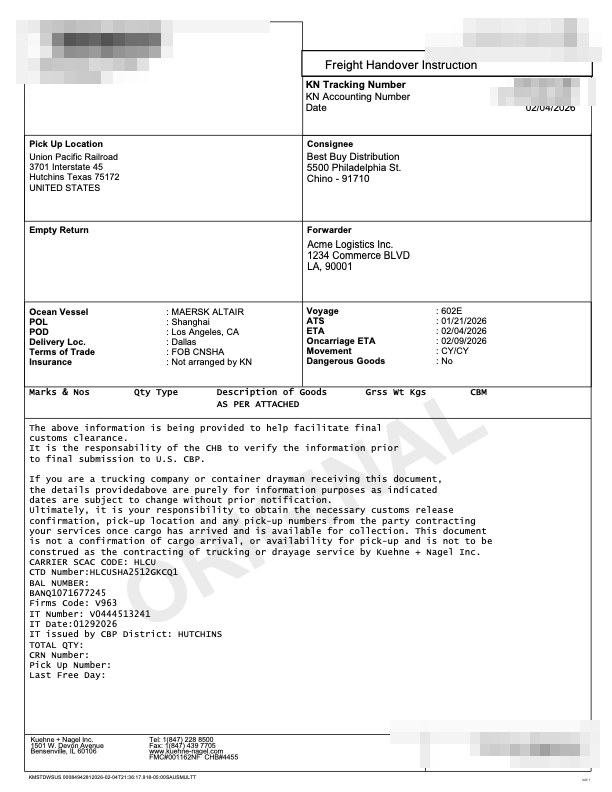
Delivery order PDF being read manually
Typing into the TMS Still on field 1
Consignee Find the ship-to on the PDF
PO number Copy the order reference
Arrival ETA Open carrier tracker and pull vessel ETA
Container Type the container number
Weight Pull the weight from the line

First the eyes find it, then the hands type it.

Still on load 1 · searching the PDF
After Melrose AI · scans and fills the whole order
Delivery order PDF being scanned automatically
Auto-detected fields Load 1
Consignee locked
PO number locked
Arrival ETA locked Pulled from carrier tracker
Container locked
Weight locked
Now on load 1

How it works

From an email to a booked load. You only touch the exceptions.

01 — Receive

Receive

Email, EDI, CSV, a portal export, or a PDF on a thread. However the order shows up, it becomes one clean order.

02 — Extract

Extract

Every field read off the document, however that customer formats it. The layout changes; the fields never do.

03 — Validate

Validate

Matched to the right shipment and checked against that customer's SOPs, the way your team would before writing it.

04 — Review

Review

Anything it isn't sure about is flagged with the source field in view, never guessed. It would rather ask than get it wrong.

05 — Sync

Sync

Written to your TMS as a new or updated load, with a full, reviewable history of what happened.

06 — Learn

Learn

Every correction is remembered. The same customer's format never trips it up twice, and the queue gets quieter every week.

Trust

It knows what it doesn't know.

A guessed field becomes a misdelivery, and a misdelivery costs real money. Melrose writes only what it's confident about and routes anything uncertain to your team, with the source in view.

That is what earns trust: the more it proves out, the more you let it run without watching.

Held for review 3
Low conf. Commodity “General freight” · 0.61 Review →
Missing Appt window not on the PDF Review →
Low conf. Stop address 2 matches · 0.72 Review →
41 fields written automatically. These 3 held for you.

The payoff

Grow the load count without growing the back office.

Every team running Melrose has gotten FTE hours back. Hear from our customers themselves:

15,000 hrs a year back, about seven full-time roles' worth Gulf Winds International
70% reduction in manual shipment-processing work RoadEx America
20% lower demurrage, year over year Customer-reported
How automated order entry reduces operational costs Self-reported customer outcomes. Magnitude varies by volume, workflow, and team.

Beyond delivery orders

The same workbench reads the rest of the stack.

DO

Delivery Order

Container, booking, terminal, and appointment for every drayage move.

RC

Rate Confirmation

The load tender behind every FTL and LTL shipment, matched to the order.

BOL

Bill of Lading

Consignee, commodity, and weight reconciled against what was quoted.

POD

Proof of Delivery

Signed receipts read and filed to close the order the moment they arrive.

Arrives from EmailEDI 204CSVPortalAPI

Delivery order automation FAQ

Automation without a blind handoff.

Straight answers on how Melrose fits your existing TMS, what it replaces, how fast it goes live, and how accurate it is.

Does Melrose integrate with our existing TMS?

Yes. Melrose writes finished loads straight into your existing TMS as new or updated shipments, and connects over the channels you already use, including EDI, API, email, and portals. It fits around the system your team runs today instead of replacing it, so there is nothing to rip out.

How does Melrose reduce manual order entry errors?

Melrose removes the repetitive typing where most errors start, then gates the rest behind confidence. Missing or low-confidence fields are routed to a review queue with the source document highlighted, so your team fixes the exception before the load is created. Every correction is remembered, so the same mistake does not repeat.

What systems does order entry automation replace or connect to?

Melrose connects to the systems you already run, including your TMS, dispatch system, EDI, and accounting tools such as QuickBooks. It does not replace them. What it replaces is the manual re-keying between an inbox and a TMS, turning incoming delivery orders, rate confirmations, and bills of lading into clean records inside your existing stack.

How long does implementation take?

Most teams are live in days, not months. Melrose configures around your existing TMS, document formats, and review rules, so there is no long integration project and no core system to replace. It learns each customer's format as your team works, so accuracy improves from the first week.

What is the difference between OCR and true order entry automation?

OCR only converts a document into text. True order entry automation reads that text, understands each field however the customer formats it, validates it against your SOPs, matches it to the right load, and writes it into your TMS. Melrose does the full job, and flags low-confidence fields for review instead of passing errors straight through.

How accurate is AI order entry compared to manual entry?

Melrose extracts delivery order fields with about 96% accuracy, and unlike a tired operator it applies the same rules to every order. It writes only the fields it is confident about and holds the rest for a person, so errors are caught before they reach the TMS. Manual entry has no such confidence check, which is where wrong container numbers and skipped references slip through.

Stop re-keying delivery orders.

Book a demo and see Melrose automate a real delivery order workflow live.

Book a demo